Wednesday, 9 April 2014


Hello Friends ! You may surprised to hear that now you can use whatsapp At zero cost. We all know that whatsapp is now the main way to communicate with others. Get to know how to use whatsapp for lifetime or make it free as long as you want. Records show that the use of whats App is increasing more. Whatsapp has seen millions of downloads and has been rated very high by users. It allows sending and receiving of both text and audio as well as video messages very easily through your Smartphone while only paying for internet access charges.
 Since the cost of sending SMS and MMS is quite high when you use the mobile service provider’s plans . Whats App provide you a much less expensive alternative. More so for people who like staying connected and messaging their friends and family for long hours all day long. The brilliant emoticons give a refreshing option to you to express yourself as much as you want.
Most of us are aware about the fact that whatsapp is free only for one year and after the completion of one year you will have to pay 0.99USD per year for the subscription of whatsapp. Since the app is free only for one year, this turns out to be a great limitation for the users of this application. Working by the time thewebpassion Team has founded a way to use whats App freely.Here are some of the method that must follow to get the service and stay connected with all your buddies with this free whatsapp.
Method 1
Requirements:
·         Android device.
·         Install the Gmail on the android device.
·         Make sure that the Whatsapp is also installed in the android device.
Steps:
·         Uninstall the whatsapp, as soon as the trial period is over
·         Create a new Gmail id by going to the Gmail account
·         Once you are done with it. Go to “Google play store”.
·         Click on the “settings” icon given on the right hand corner at the top.
·         After clicking on the settings, go to the “account settings”.
·         Change the new Gmail id with the older one.
·         Once again Download the whatsapp
·         Now open and sign in to whatsapp account.

       
Every year as soon as your free subscription of whatsapp is over use this method and get one year free subscription of whatsapp. It is a simple yet effective method that will help you use the whatsapp without paying any money for it.

Method 2

Requirements:
Get an Android device.
Whatsapp should be installed in that android device.

Steps:
·         Open your whatsapp account.
·         Go to the section of “settings” in your whatsapp account.
·         Now click on the account stings.
·         Click on “delete my account.”
·         Your phone number would be asked when you click on delete my account. .
·         Give your number there and click on “delete my account”.
·         You are no longer on whatsapp.
·          
ü  Now all you have to do is to create a fresh account on whatsapp, as you did in the
beginning when you opened a whatsapp account for the first time.

ü  Go to the “settings” and check the expiry date info of your new account, after which click on “account” and then “payment info”. You’ll be amazed to see that your whatsapp validity is extended.
Verdict:
Follow these simple and quick methods and enjoy a free whatsapp for rest of your life. You can save your hard earn money by following these methods once in a year, whenever your account is about to expire.


Tuesday, 8 April 2014


Hello Friends! This post of gonna help you a lot.Lots of web sites have disabled the right click function of the mouse button. it's really, really annoying. This is done so that you don't steal (via right-click->save picture) their photos or images or any other goodies. Unfortunately, it disables ALL right-click functionality: copy, paste, open in new window. 

Now  it  is very easy. Have a look on this. It's easy to change, assuming your using IE 6: 

1. Click "Tools"->"Internet Options" 

2. Click the "Security" tab 

3. Click "Custom Level" 

4. Scroll down to the "Scripting" section 

5. Set "Active Scripting" to "disable" 


Click "Ok" a couple of times. 

When your work is done you must turn this back to "enable". 'cause  generally the javascript enhances a website.


Best Hacking Tricks To Increase Your Internet Speed | Speed Up Your Net Speed
Hello Friends! My new how to post is this. From this post of mine you will be able to increase your internet speed by 40%.we all know that a slow internet connection really costs time and makes feel annoying. Many friends ask me the ways to increase their internet speed. However, it's possible to do to some extent and make your internet much better then it was in the past. I worked on it a lot and finally find out some ways to increase the speed.

Thewebpassion team find out Two tricks that will help you to increase your internet speed.


First Method- Speed Up Your Net Speed By 20%


1. First you go to start button

2. Go To Run

3. Type gpedit.msc And Then Hit Enter.

4. Then Expand Adminsitrative Templates.

5. Then Network

6. Then QoS Packet Scheduler.

Now A New List Appear. Click On Limit  Reservable Bandwidth.
Just Disable it.

Now You Click On Apply .

That's It Now You Are Done !! :)

Now Just Restart Your Computer. And I hope You will Get change in Your Speed

Some Basic Tricks From My Side-


1. Use IDM To Boost Your Downloading Speed.

2. Use A Good Anti-virus in Your Computer.

3. Remove Unwanted Add-ons, Software,Unwanted Files Form Your Computer.

4. Update Your Drivers Periodically.

5. Always on your anti-virus firewall.

5. Keep A Good Maintainance Of Your Computer.


Regards from- thewebpassion

Sunday, 6 April 2014

Hello friends! Long time to post something. So here I am back with an interesting HOW TO? fact. This time you will happy to know that how can you use more than one account in Whatsapp. Whatsapp as you all know one of the world’s most famous internet chatting messenger, through this you can send message to your friend sitting anywhere and any part of the world without paying a single penny, but as we all know the every coin has two sides this chatting messenger also has one disadvantage that you cannot run multiple whatsapp account on android device.  
This drawback is present in whatsapp because whatsapp uses unique  IMEI address as username and your mobile number as password and as we all know that every device can only have one IMEI address thus no two whatsapp accounts can be operated using single device.


But Now the Question occurs how can be this possible. then the solution is - SwitchMe Multiple Accounts App

 original


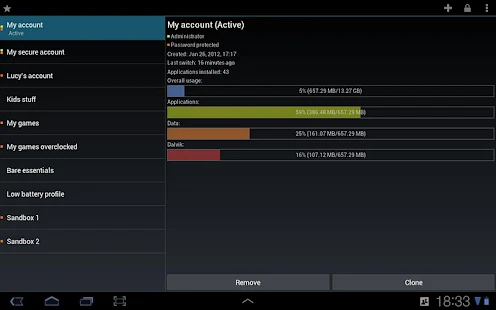
SwitchMe is a wonderful app that allows you to login and logout of multiple user spaces same as we do in a desktop computer, with each account having its own system settings, data and applications.

Pros:
  • One device can be shared by many users with password protected accounts.
  • You can create a profile for kids, and let them have access to the apps you feel comfortable with.
  • Now you own a profile that is away from kid’s games, messenger or bloat ware to slow things down.
  • Overclock your profile for maximum performance in intensive games.
Cons:
  • Root access is required.
Download app from here

How to Use Multiple Whatsapp Accounts on Android:
  • Open the SwitchMe app. It asks for the super user request.
  • You have to grant that request.
  • Now you have to create 2 different profiles to configure 2 different Whatsapp accounts, both the accounts will have their own data.
  • First profile will be the admin profile. The apps you are using presently will be available with this profile.
  • Now you can switch to the second profile using SwitchMe app.
  • After which you can download the Whatsapp from Google play store.
  • After installation, register your new SIM.
  • You   are done with everything, now you can enjoy the multiple Whatsapp account in your smartphone.

 At your service: Thewebpassion    

Thankyou


Description

SwitchMe allows you to log in and out of multiple user spaces just as you would on a desktop computer, with each account having its own system settings, apps and data.

·         APP REQUIRES ROOT PERMISSIONS AND CAUTION, READ BELOW CAREFULLY
·         APP PROVIDED WITHOUT EXPLICIT SUPPORT OF ANY KIND, READ CAREFULLY
*Needs root access, check below for more information and critical warnings.

Some of the benefits of this technology:

• Privacy - Securely share one device among many users, protect your accounts with passwords and log out automatically.
• Kids - Create a profile for the kids, with only the apps and access you feel comfortable with.
• Gaming - Overclock your profile for maximum performance in intensive games
• Speed - Imagine a buttery smooth profile, with no kids games, messengers or bloatware to slow things down.
• Testing - Create a sandbox profile to easily test applications and themes - no more nandroid nightmares!
• Battery - Switch to a profile which only contains the essentials to save power through brute force.


Saturday, 22 February 2014

This summary is not available. Please click here to view the post.
  HOW to speed up your PC (PART-1)


Hello Friends! Today my new post is about how to speed up your pc.This is a very common problem we come across in our routne.I know,When your PC got to slow evry thing become vulnarable to do.Slowing of PC is not done by just one thing but there are numbers o reasons responsible.Many of you if claim that your PC is very fast then have look on your pc performance.How to check your PC performance.When you install some software with that many malicious browser are also installed that you didnot want ultimately slower down your computer.To have full amusement from your pc. Make sure that you have done with the following steps:-


1) Be sure your hardware is sufficient

Either more or either less  everything you can do with software to optimize the function of your computer, making sure you have the proper hardware to support Windows .

2) Clean your PC on regular basis

Yes, just suppose you did't bath for 7 days how you fell.i think you got my point. same thing happens with your PC it is a machine and also it requires service.do it yourself by deleting the temprary files, cookies, prefetch file because when you durf web some are ere left in your computer as a memory these files doesnot harm instantly,but when they get older they start slowing down your computer.
be sure that you delete them.

                       This software can do it better then have a look on this software.
                                          Cclener-(recommened)
                                The most successful software in cleanig your PC.


3) Scan for viruses,Spam And Adware if any

Every one of you are familier with these terms viruses the biggest danger for your PC.This hates your PC and slows down. Every Windows computer is vulnerable to viruses. Viruses are nasty little programs that cause both major and minor problems for users.Spyware and Adware are programs created by companies to find out more information about customers, so they can better market products to them. Usually these programs are not created for malicious purposes. Spyware and Adware can load into computer memory and slow it down.

4) Uninstall unwanted programes

Instantly uninstall the unwanted programes that you think you have ever your used them.sometimes we think let it be there , it will be used sometime but it is not they can bring down your PC speed.

5) Clean your desktop
Is your Windows Desktop dotted with files? Have you noticed that your computer has been running slower and slower? Do you see the hard drive light often flashing while you wait for the computer to respond to an action? There are steps you can take to fix it.Have small and less icons ton the desktops.End up most working applications that are runnong of no use.scan your every file that exist on your pc.
             
                      I think you will pay attention on these rememberable things.
                                                                                        -regards:-team the web passion
                                                                                                                     To be continuded...